
What is Kling v2.5 Turbo Pro?
Kling v2.5 Turbo Pro is the latest “Turbo” tier in Kuaishou’s Kling AI video model lineup. In its official announcement, Kuaishou describes the model as a significant upgrade to both text‑to‑video and image‑to‑video generation, with improvements in prompt adherence, motion quality, visual aesthetic, and overall stability. The release is framed as a production‑ready update aimed at professional use cases such as advertising, film, animation, games, and short‑form creative content.
While Kling models already emphasized cinematic motion and style control, Kuaishou says the v2.5 Turbo Pro release focuses on reducing hallucinations and increasing the reliability of complex multi‑step instructions. That focus on controllability is a key theme of the release and shapes the model’s positioning: a dependable, high‑quality video engine rather than a purely experimental system.
Official performance claims and blind‑test results
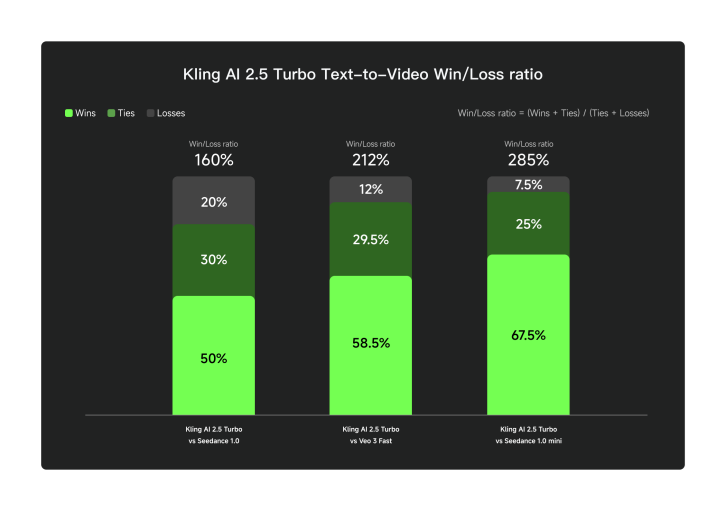
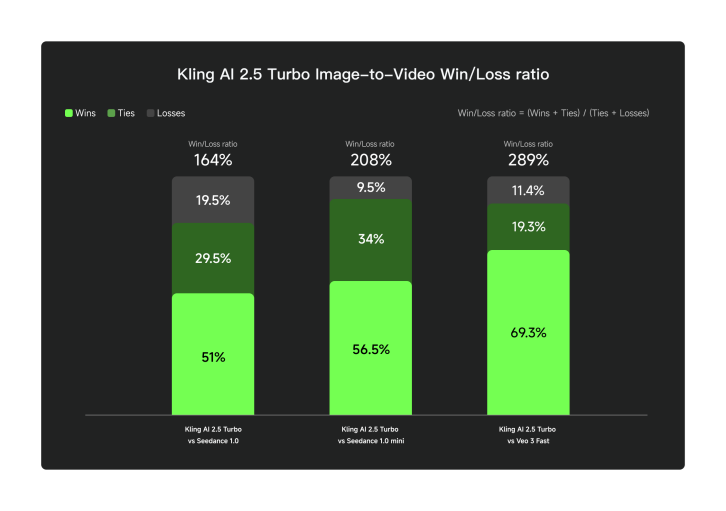
Kuaishou’s announcement includes reported win‑loss ratios from blind human preference tests. The company states that in text‑to‑video evaluation, Kling v2.5 Turbo Pro achieved win‑loss ratios of 285%, 212%, and 160% against Seedance 1.0 mini, Veo 3 fast, and Seedance 1.0, respectively. In image‑to‑video evaluation, the reported win‑loss ratios are 208%, 289%, and 164% against the same competitors. These numbers are presented as company‑reported results, so they should be interpreted as internal benchmarking rather than independent verification.
The charts below are the official evaluation graphics released by Kuaishou. They show the reported win‑loss ratios for text‑to‑video and image‑to‑video tests, which the company uses to illustrate its quality gains over peer models in the same category.
How to interpret the win‑loss ratio
A win‑loss ratio is a summary of preference votes in a head‑to‑head comparison. If a model is reported at 200%, it implies that human evaluators chose it roughly twice as often as the comparison model in that test setup. It does not measure absolute quality or guarantee that every output is “twice as good.” Instead, it is a directional signal that the model performed better under the specific testing conditions chosen by the vendor.
For real‑world workflows, the win‑loss ratio is most useful as a confidence indicator. It suggests that, in aggregate, the model is likely to produce more preferred outputs given the same prompt and configuration. But creative teams should still run their own tests, because your use cases (product shots, stylized animation, cinematic scenes) may weight quality factors differently than the vendor’s benchmark mix.
Quality upgrades highlighted by Kuaishou
The official release describes several concrete improvements. On the prompt side, Kling v2.5 Turbo Pro is said to handle more complex multi‑step instructions, while also maintaining stronger semantic alignment across the full clip. This matters for prompts with chained actions or cause‑and‑effect logic, where earlier models often drifted off‑topic after the initial frames.
Motion quality is another focal point. Kuaishou emphasizes smoother dynamic motion, more realistic camera movement, and improved physical plausibility in object interactions. The release also calls out better rendering of subtle facial expressions, which is especially relevant for character‑driven content or narrative storytelling.
In image‑to‑video, the company reports improved consistency in style transfer, with stronger preservation of color, lighting, and texture cues from the reference image. This is useful for workflows that need stable art direction or brand‑consistent visuals across a sequence.
What the upgrades mean in practice
The most visible benefit of better prompt adherence is that you can describe more complex sequences without the model “forgetting” constraints. For example, if a prompt requires a character to move through a room, interact with an object, and end in a specific pose, earlier models often handled only the first action. Kling v2.5 Turbo Pro is positioned to follow the sequence more consistently, which reduces the number of retries needed to land a usable clip.
The motion and physics improvements matter most when you need dynamic scenes: sports actions, vehicle motion, or interactions with environmental elements like water and cloth. The release claims smoother motion and improved physical plausibility, which should translate into fewer unnatural transitions or jittery frames. While results will still vary by prompt, the model is positioned to deliver more stable output for fast‑moving scenes.
Style consistency in image‑to‑video is also a practical upgrade. When you use reference images for brand‑aligned visuals or character identity, a stronger match in color, lighting, and texture means less post‑processing and fewer failed takes.
Cost and throughput changes
Beyond quality, Kuaishou frames v2.5 Turbo Pro as a more economical model. The announcement states that the cost of a five‑second 1080p clip dropped from 35 credits to 25 credits — a reduction of roughly 30%. For teams running large volumes of short clips, that pricing shift is meaningful because it directly impacts iteration speed and production budgets.
Lower per‑clip cost also changes the creative process. Teams can afford to generate more variations per concept, which makes it easier to explore multiple ideas before choosing a final direction. When video generation is expensive, the temptation is to over‑specify a single prompt and hope it works. With a lower cost per iteration, it becomes more practical to explore a range of shots and select the strongest output.
The pricing figure is a provider‑level reference from the official release. If you are using Kling through another platform or a managed service, the final billing model can differ, so it is best to treat this as an official baseline rather than a guarantee of pricing in every deployment context.
Use cases where Kling v2.5 Turbo Pro shines
Kuaishou’s release highlights applications in film, short‑form drama, gaming, animation, and advertising. In practical terms, the model is most valuable when you need cinematic motion and stable style in short clips. The improvements to prompt adherence also make it a stronger fit for ad concepts or scripted content, where you need specific actions to occur on cue.
The model’s strengths make it especially useful for professional creative teams who want to prototype motion sequences before investing in expensive production. It can also serve as a high‑throughput option for A/B testing different story beats, camera angles, or style variants without committing to full post‑production.
Another common workflow is previsualization for live‑action shoots. Directors can explore camera blocking, scene pacing, and character movement before committing to a physical set. For game studios, the model can generate short animation tests that help validate mood and art direction. For marketing teams, it can create rapid concept variations for ads and social content, enabling faster iteration cycles.
Parameter chart (current options in this interface)
The following table reflects the parameters available in this product’s Kling v2.5 Turbo Pro configuration. These are implementation‑level controls rather than official provider limits, so treat them as the practical operating range for this interface.
| Parameter | Value |
|---|---|
| Input type | Text or image |
| Aspect ratios | 1:1, 16:9, 9:16 |
| Durations | 5s or 10s |
| Outputs per request | 1 |
Planning for 5‑second vs 10‑second clips
Kling v2.5 Turbo Pro is designed for short‑form clips. Five‑second outputs are best for single actions or one clear beat, like a product spin or a character gesture. Ten‑second clips are better for mini‑stories where you need a beginning, middle, and end. A simple structure is to spend the first third establishing the scene, the second third on the main action, and the final third on the result or closing moment.
When you compress too many actions into a five‑second clip, the model can struggle to maintain coherence. If you need a longer sequence, break it into multiple clips and stitch them in post‑production. This strategy often yields more consistent motion and easier control.
Prompting strategies for better adherence
Given that prompt adherence is a headline improvement, you can take advantage of it by using structured prompts with clear subject‑action relationships. A strong pattern is to specify the subject, the action, the environment, and then the camera movement. For example: “A dancer performs a slow spin on a rooftop stage, city skyline at dusk, smooth tracking shot from left to right.” This makes the intended motion explicit and reduces ambiguity.
If you need multi‑step motion, list the steps in chronological order and avoid chaining too many actions in a single sentence. The model is optimized for short clips, so two or three sequential actions are typically safer than long, story‑like paragraphs.
For image‑to‑video, let the reference image define the visual style and use the prompt to describe motion and camera behavior. This helps preserve color, lighting, and texture cues from the reference image while still introducing dynamic movement.
Shot composition and camera language
Kling’s upgrade is most valuable when you communicate camera intent clearly. Treat the prompt as a short shot list: define the focal subject, specify the framing (wide shot, medium shot, close‑up), then name the camera movement. This helps the model choose a consistent perspective across the clip rather than drifting between framings.
For example, if you want a subject to remain centered, say “center‑framed” or “locked‑off camera” and avoid conflicting movement cues. If you want a dynamic feel, use “handheld” or “slight shake.” Small camera qualifiers like “slow,” “smooth,” or “steady” often improve motion stability because they tell the model how aggressive the movement should be.
Text‑to‑video prompt patterns
A reliable pattern for Kling prompts is to specify: subject, action, environment, camera, and style. Here are example structures you can adapt for your own scenes. These are guidance patterns rather than official prompts.
- “Subject + action” first, then add environment details and camera movement.
- Use explicit camera verbs like “tracking,” “orbiting,” “dolly in,” or “slow pan.”
- Include lighting cues such as “soft dawn light” or “neon reflections” for mood.
- Keep the prompt focused on one main action per clip for best stability.
For cinematic sequences, add a short style tag at the end, such as “cinematic, shallow depth of field” or “high‑contrast noir lighting.” This keeps the semantic core intact while giving the model a clear aesthetic direction.
Image‑to‑video consistency tips
Image‑to‑video works best when the reference image already captures your intended style and framing. Kling v2.5 Turbo Pro reportedly improves reference image consistency, but a strong input still matters. Use clean, well‑lit images with a clear subject to reduce ambiguity.
When you want motion, describe it explicitly rather than repeating the visual description of the image. For example, “slowly zoom in on the subject,” “subtle breeze moving hair,” or “camera tilts up to reveal the skyline.” This keeps the model focused on movement while the image anchors appearance.
If you need a stronger style transfer, keep the prompt short and emphasize the motion only. Over‑specifying style can lead to conflicting signals if the image already defines the style.
Maintaining continuity across multiple clips
Many productions require a sequence of short clips that feel like a continuous story. The easiest way to maintain continuity is to reuse a stable prompt skeleton and vary only the action or camera movement. Keep the subject description, environment, and style constant so the model has a consistent anchor. This reduces visual drift across clips and makes the final edit feel more cohesive.
If you are working from a reference image, keep that image constant across the sequence and only adjust the motion description. This is especially important for character‑driven content, where small changes to facial features or clothing can break continuity. For multi‑scene narratives, consider creating a small set of “key frames” and use them consistently as reference images for different shots.
Consistency also applies to aspect ratio and duration. A series of clips with identical frame size and length is easier to assemble in post‑production and reduces the need for resizing or timing adjustments. For storytelling, it is often better to keep the camera movement style consistent across a sequence to preserve a coherent visual language.
Production workflow checklist
For professional teams, Kling v2.5 Turbo Pro is most effective when you build a repeatable workflow. A typical loop is: define a shot list, generate drafts, select winners, and then refine with targeted prompt edits. Because short clips are cheap to generate, you can test several variants quickly and keep only the best.
It also helps to standardize aspect ratios and durations within a project. This reduces editing overhead and makes it easier to combine clips in post‑production. If your project needs both portrait and landscape outputs, treat them as separate batches with dedicated prompts and evaluation criteria.
Evaluation rubric for selecting the best takes
When you generate multiple candidates, evaluate them against a short rubric rather than choosing the most visually dramatic clip. A typical rubric includes: prompt adherence (does the action happen as described), motion stability (no sudden warps or flicker), visual clarity (subject remains recognizable), and aesthetic fit (lighting and style match the brief).
Scoring outputs this way makes it easier to iterate systematically. If a clip fails on adherence, adjust the action description. If it fails on stability, reduce motion intensity or simplify the scene. This process helps you converge faster than random prompt tweaks.
Limitations and quality review
Even with improved stability, short‑form video generation can produce unexpected artifacts. Common issues include rapid flicker in complex textures, inconsistent object geometry during fast motion, or camera movement that drifts from the described path. The best mitigation is to keep prompts focused and to review outputs carefully before production use.
The model is optimized for short clips, so it is not a direct substitute for long‑form storytelling. If you need a longer narrative, treat Kling outputs as building blocks and assemble them in editing. This approach gives you tighter control over pacing and reduces the risk of motion drift across a long timeline.
For brand‑sensitive work, add a quick compliance review. Check for unintended symbols, distorted text, or background elements that could conflict with brand guidelines. Short clips move quickly, so small visual mistakes can be easy to miss without a focused review.
For mission‑critical assets, plan for a manual review step. If a clip is close but not quite correct, adjust the prompt to clarify the motion or reduce the number of competing elements. Small changes — like removing a secondary action or tightening the camera instruction — often yield disproportionately better results.
Reported benchmark comparison
The official announcement provides win‑loss ratios from Kuaishou’s internal blind tests. The table below summarizes those reported results to help you compare Kling v2.5 Turbo Pro against other widely referenced video models. These are not independent benchmarks, but they are the only official performance numbers published for the model at launch.
| Evaluation | Comparator | Reported win‑loss ratio |
|---|---|---|
| Text‑to‑video | Seedance 1.0 mini | 285% |
| Text‑to‑video | Veo 3 fast | 212% |
| Text‑to‑video | Seedance 1.0 | 160% |
| Image‑to‑video | Seedance 1.0 mini | 208% |
| Image‑to‑video | Veo 3 fast | 289% |
| Image‑to‑video | Seedance 1.0 | 164% |
The key takeaway is that Kuaishou claims substantial quality gains in both T2V and I2V benchmarking. If you are comparing models based on vendor‑reported results, Kling v2.5 Turbo Pro is positioned as a top‑tier option in this generation.
FAQ
Is Kling v2.5 Turbo Pro designed for text‑to‑video and image‑to‑video?
Yes. The official announcement explicitly describes upgrades to both text‑to‑video and image‑to‑video generation in the v2.5 Turbo Pro release.
Are the benchmark results independently verified?
The published win‑loss ratios come from Kuaishou’s own blind tests. They are useful indicators but should be treated as company‑reported results rather than independent benchmarks.
What pricing changes were announced?
Kuaishou reported a drop in the cost of a five‑second 1080p clip from 35 credits to 25 credits, or about a 30% reduction. This is a provider‑level reference and may differ across platforms.
When should I pick Kling v2.5 Turbo Pro?
Choose it when you need high‑quality motion, strong prompt adherence, and stable style control, especially for short cinematic clips or professional creative workflows.