
What is Seedream 4.0?
Seedream 4.0 is ByteDance Seed's flagship image generation model for text to image and image editing. The official release notes describe it as a unified architecture that handles both creation and editing in the same model, with strong semantic understanding and high resolution output. It is built for production workflows that need consistent visual quality and dependable editing behavior.
The model emphasizes logical understanding, text rendering, and multi subject reasoning. Compared with prior Seedream versions, Seedream 4.0 improves the ability to follow complex instructions while keeping outputs visually coherent.
Official capability snapshot
The Seedream 4.0 model page highlights unified multimodal generation, adaptive aspect ratios, and up to 4K output resolution. It supports text to image and image to image workflows, along with multi image reference inputs for stronger consistency. The model also supports multiple output images per request for fast exploration.
| Parameter | Official value |
|---|---|
| Inputs | Text, image, multi image references |
| Outputs | Image |
| Modes | Text to image, image editing |
| Resolution | Up to 4K output |
| Aspect ratio | Adaptive |
| Multi output | Supported |
Key improvements in Seedream 4.0
Seedream 4.0 introduces notable upgrades across understanding, rendering, and editing. The official blog highlights improved logical comprehension and richer style control, allowing the model to handle more complex prompts without losing structure. It also emphasizes stronger text rendering, which is critical for posters, packaging, and UI mockups.
Another major focus is efficiency. Seedream 4.0 reports a significant inference speed improvement compared with Seedream 3, which helps teams generate more variations in the same time window. The release notes also emphasize multi image reference workflows to lock in subject identity and style across multiple generations.
Advanced reference workflows
The Seedream 4.0 documentation describes a flexible reference system that accepts multiple images at once. This allows you to combine identity, style, and layout references in a single request. In practical terms, you can supply a product photo, a mood board, and a background texture image to guide the generation. The model can handle a large number of references, which is useful when you need consistent outputs across a product line or campaign.
- Use one reference for subject identity and another for lighting or style.
- Keep prompts focused on changes rather than re describing the reference.
- Generate multiple outputs to compare composition variations quickly.
- Save reference sets for repeatable brand assets.
Editing and transformation
Seedream 4.0 supports text guided image editing, which is useful for refining existing assets rather than generating from scratch. This includes adjusting lighting, changing background environments, or applying a new art style while preserving the core subject. The unified architecture means the same model handles creation and editing, which keeps outputs more consistent across tasks.
Prompt: Update the reference image to a bright morning scene.
Keep the subject pose and outfit unchanged.
Add: Soft sun rays, pale blue sky, warm highlights.
Prompt: Convert the reference image into a product poster layout.
Style: Clean typography, bold headline, minimal background.
Resolution and aspect ratio strategy
Seedream 4.0 supports adaptive aspect ratios and up to 4K output. Use this to your advantage by selecting aspect ratios that match your final placement. For example, use 16:9 for presentation slides, 4:5 for social ads, or 1:1 for marketplaces. When producing multiple crops of the same concept, generate the largest size first and then downscale to avoid artifacts.
If you need crisp typography, keep the scene simple and leave generous negative space around text elements. Complex backgrounds can make type illegible even at high resolution.
Text rendering guidance
The Seedream 4.0 release notes emphasize improved text rendering. To maximize legibility, specify the exact text, font style, and placement. If the text is critical, use a short phrase and avoid long paragraphs. For packaging and posters, include a plain background instruction so the model does not blend text into the scene.
Prompt: Product poster with headline text "New Dawn" in bold sans serif.
Place the headline centered at the top with strong contrast.
Background: solid navy gradient, minimal distractions.
Official example prompts
These examples come from the official Seedream 4.0 model page. The prompts below are translated into English from the original Chinese text.
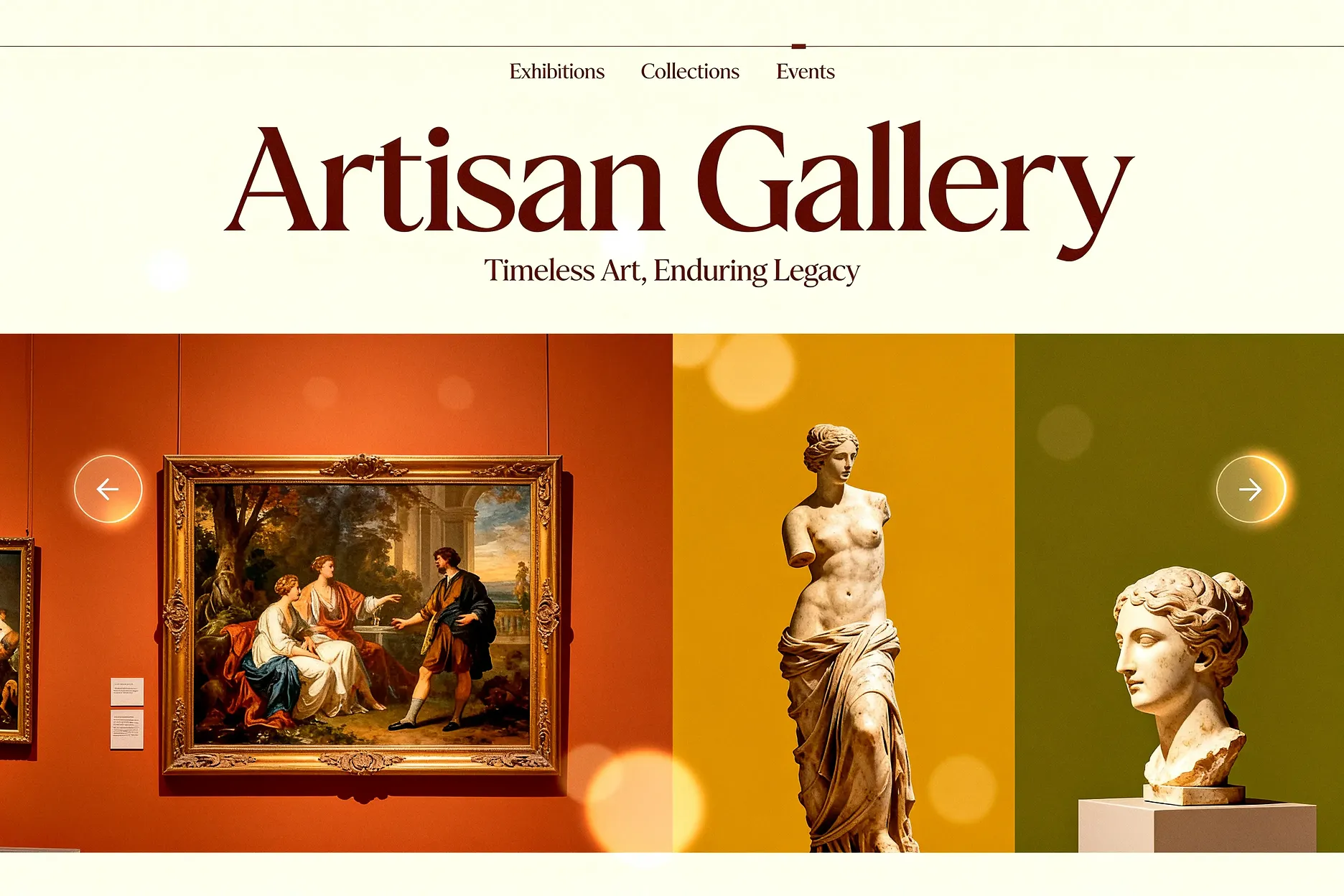
Official prompt (translated)
Design a retro-style website for a high-end art museum. Overall earth-toned palette, clean layout, focus on large images of the collection.
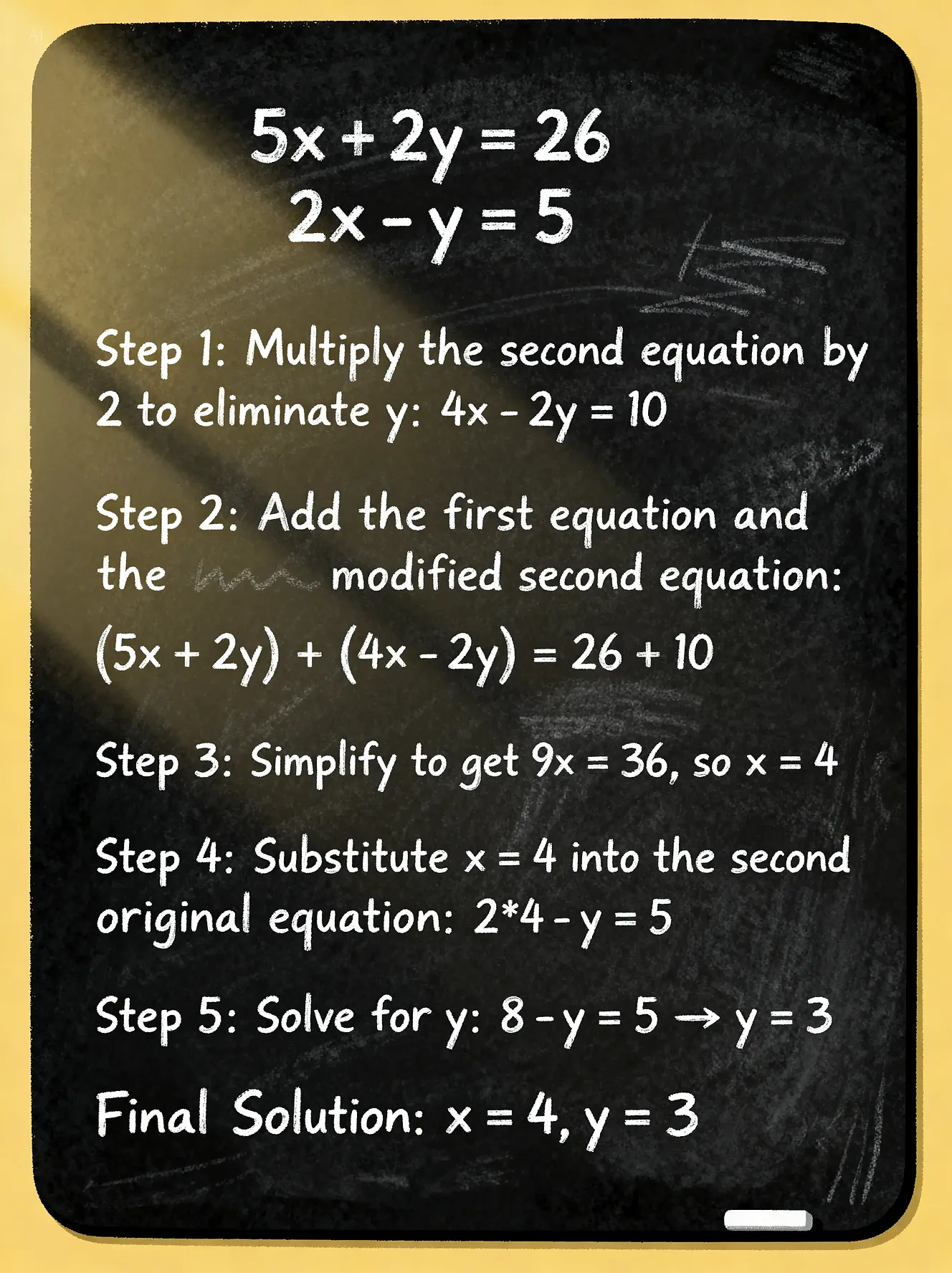
Official prompt (translated)
Draw the following system of linear equations and its solution steps on a blackboard: 5x + 2y = 26; 2x - y = 5.

Official prompt (translated)
Draw a poster that helps people understand the harms of staying up late.
Benchmark positioning
ByteDance Seed's official materials cite evaluations on internal benchmarks such as MagicBench and MagicArena, alongside third party leaderboards like Artificial Analysis. The model is positioned as a top tier image generator in those comparisons. While benchmark scores are helpful, always validate with your own prompts to confirm fitness for your specific workflow.
Best fit use cases
Seedream 4.0 is a strong option when you need high resolution imagery or complex editing. It works well for:
- Brand and product marketing visuals that need sharp detail
- Campaign assets that require consistent style across many outputs
- Poster, packaging, and mockup design with readable text
- High resolution concept art and illustration work
- Iterative editing of existing product photography
Production checklist
When you use Seedream 4.0 in production, apply a lightweight checklist to avoid rework. The goal is to ensure each output meets brand quality without slowing down iteration speed.
- Confirm that key text is readable at the target resolution.
- Check edges and silhouettes for artifacts after resizing.
- Validate lighting consistency across a series of outputs.
- Keep reference images archived with the final prompt.
- Use multiple outputs to choose the cleanest layout.
Seedream 4.0 vs Seedream 5.0 Lite
Seedream 4.0 focuses on high resolution generation and strong editing pipelines, while Seedream 5.0 Lite adds a deep reasoning layer and real time search enhancement for time sensitive prompts. If you need the highest fidelity outputs and 4K resolution consistency, Seedream 4.0 is a strong choice. If you need faster iteration with more flexible reasoning, Seedream 5.0 Lite is worth testing.
| Model | Strength | Best for |
|---|---|---|
| Seedream 4.0 | High fidelity outputs and editing | 4K visuals, precise layouts, brand assets |
| Seedream 5.0 Lite | Efficient multimodal generation | Fast iteration, reasoning heavy prompts |
FAQ
Does Seedream 4.0 support 4K output?
Yes. The official model page explicitly states that Seedream 4.0 supports up to 4K output resolution with adaptive aspect ratios.
Can I edit images using Seedream 4.0?
Yes. Seedream 4.0 supports text guided image editing and image to image transformations.
How many reference images can I provide?
The official documentation highlights multi image references, enabling multiple inputs to preserve identity and style across outputs.
Is Seedream 4.0 good for text rendering?
The release notes emphasize improved text rendering and layout control, making it suitable for posters, packaging, and UI mockups.
Does Seedream 4.0 output multiple images per request?
Yes. The model supports multiple output images per request for faster iteration.
How should I choose between Seedream 4.0 and other image models?
Use Seedream 4.0 when you need high resolution, strong editing, and precise visual structure. Compare outputs alongside other image models in AI Onekit to pick the best fit.