
What is Seedream 5.0 Lite?
Seedream 5.0 Lite is the efficiency focused variant of the Seedream 5.0 series. The official model page describes it as a unified multimodal image generation model that supports both text driven creation and image driven editing. It is positioned for real world creative workflows that need fast iteration while still maintaining strong image text alignment and subject consistency.
ByteDance Seed's release notes emphasize improvements in multimodal understanding, reasoning, and generation. Seedream 5.0 Lite is designed to be approachable for daily production use, with support for multi image references, multiple output images per request, and refined style transfer. If you need high throughput design exploration or quick creative iteration, it is a strong fit in the Seedream family.
Official capability snapshot
Seedream 5.0 Lite is built around a unified multimodal workflow. The official model page lists support for text to image generation, image to image transformation, and combined text plus image editing. It accepts multiple reference images and can return multiple images in a single request. These workflows make it suitable for style transfer, layout exploration, and brand consistent asset creation.
| Parameter | Official value |
|---|---|
| Inputs | Text, image, multi image references |
| Outputs | Image |
| Modes | Text to image, image to image, text plus image editing |
| Multi output | Supported |
| Multi reference | Supported |
| Status | Available on Seedream model hub |
Key improvements highlighted by ByteDance Seed
The official launch write up for Seedream 5.0 Lite outlines a series of upgrades that explain how the model performs better in production scenarios. The model is described as a comprehensive multimodal generation system, with improvements in understanding, reasoning, and image creation. It emphasizes stronger subject consistency, tighter image text alignment, and a deeper world knowledge base that helps with realistic scene composition.
Seedream 5.0 Lite also introduces a deep thinking pipeline and a real time search enhancement path for time sensitive queries. This is especially useful when prompts reference new brands, current events, or recent visual trends. It can also render information visualization with improved visual reasoning, helping teams create diagram or infographic style outputs without manual layout work.
Creative strengths and workflows
Seedream 5.0 Lite is built for rapid iteration in creative pipelines. It supports multi subject prompts, style transfer, and controlled editing. The official documentation highlights flexible reference usage, which means you can provide a brand style frame, a product photo, and a color palette reference in the same request.
- Brand consistent asset creation with multi image references
- Fast concept exploration with multiple output variations
- Style transfer for marketing and social visuals
- Image editing with natural language instructions
- Infographic style layouts and information visualization
Prompting guidance for best results
For Seedream 5.0 Lite, write prompts that separate subject, environment, lighting, and style. When using reference images, explain what each reference should influence. The model performs best when you explicitly call out which elements must remain fixed and which can be changed.
Prompt: Minimalist product hero image for a matte black smart speaker.
Style: Clean studio lighting, soft shadows, subtle reflection.
Notes: Keep the speaker design identical to reference image #1.
Background: Warm gray gradient, no text, no logos.
Prompt: Transform the reference photo into a cinematic dusk scene.
Keep the subject pose and outfit from the reference image.
Add: Blue hour lighting, soft rain, wet pavement reflections.
Prompt: Create an infographic style layout explaining the water cycle.
Style: Flat vector, pastel palette, clear labeled arrows, simple icons.
Official example prompts
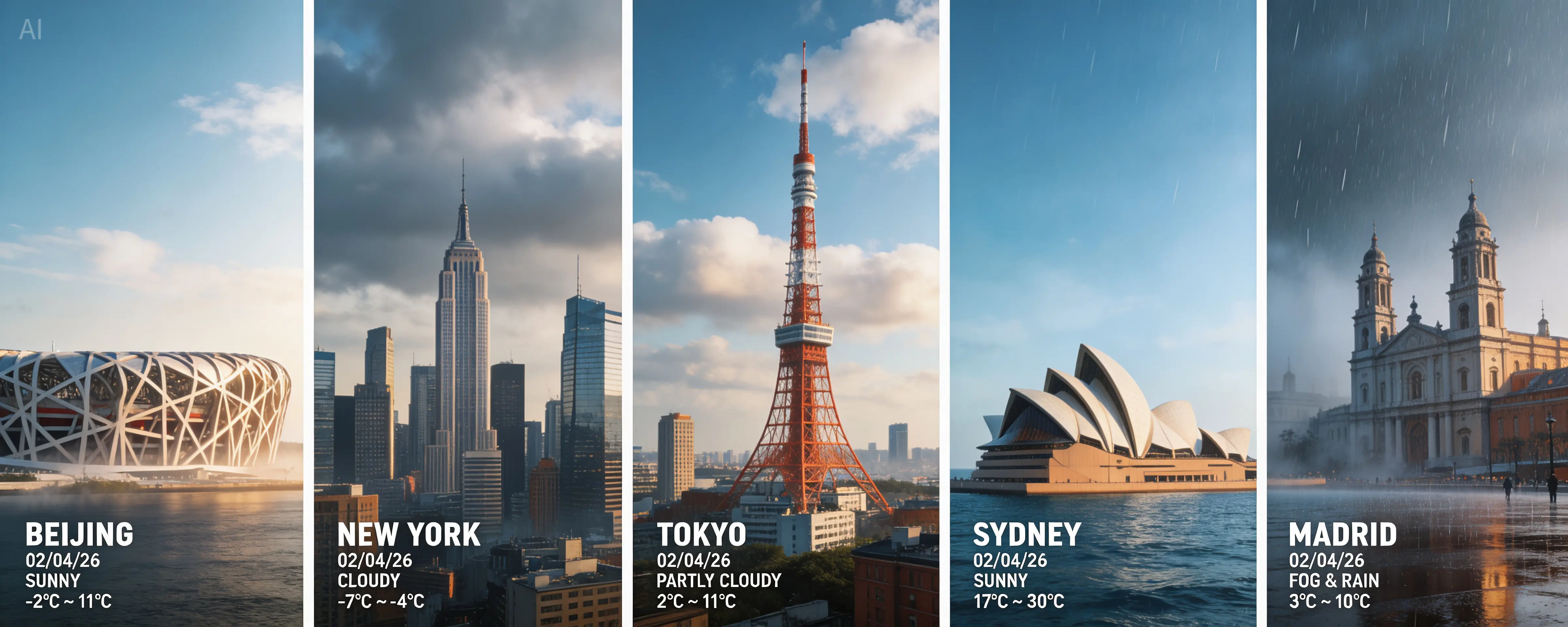
The following examples are taken from ByteDance Seed's official Seedream 5.0 Lite model page. Use them as references for how to structure detailed, high-control prompts.
Official prompt
Search for the weather, temperature, and time on February 4, 2026, for the following locations: 1. Beijing, 2. New York, 3. Tokyo, 4. Sydney, 5. Madrid. High-concept composite photography. Note: only return ONE image. The image is composed of five seamlessly stitched vertical panoramic strips. Each strip presents the real-time weather and lighting of a specific location: Far left (Beijing): the Bird's Nest Stadium. Left-center (New York): vertical skyscrapers of Manhattan. Center (Tokyo): Tokyo Tower. Right-center (Sydney): the Opera House. Far right (Madrid): San Francisco el Grande Cathedral. Despite different weather conditions, use cinematic color grading to unify the image. High contrast, 8K resolution, photorealistic masterpiece.

Official prompt
Realistic photographic science poster. A wild elephant is located in a tropical savanna. At the top is the title: "Let elephants not rely on imagining." Below the title, inside a framed box, it says: "August 12: World Elephant Day." In the lower-left corner, within a black semi-transparent box, there are three sections of educational text about wild elephants. In the lower-right corner, there is a QR code.
Reference image strategy
Seedream 5.0 Lite supports multiple reference inputs, which helps maintain consistency across a series of outputs. Use reference images for the elements you want to lock in, such as a brand style, a product silhouette, or a character outfit. For style transfer, include a single strong style reference and keep the text prompt focused on the new content rather than repeating style details.
- Label each reference image with a clear role in the prompt.
- Use one reference for subject identity and one for overall style.
- Avoid mixing conflicting styles in the same request.
- Ask for multiple variations to compare in a single batch.
Quality control checklist
When you are generating production assets at speed, quality control matters just as much as creativity. Seedream 5.0 Lite benefits from a short checklist that can be applied to each batch before the output is shared with stakeholders or customers.
- Verify subject identity against references for consistency.
- Check typography and iconography for legibility and spacing.
- Confirm brand colors match your approved palette.
- Inspect backgrounds for artifacts or conflicting visual noise.
- Make sure lighting direction and shadows align with the scene.
Team workflows and collaboration
Seedream 5.0 Lite is ideal for collaborative teams because it can generate multiple options in a single run. Creative leads can review variations while marketers refine copy and\n designers keep visual standards consistent. Saving prompt templates and reference bundles\n helps teams reproduce successful generations without rework.
In AI Onekit, you can keep prompt recipes alongside final outputs so that a future campaign can reuse the exact same visual system. This is especially useful for product lines where consistent lighting, framing, and background tone are important for trust and recognition.
Seedream 5.0 Lite vs Seedream 4.0
Seedream 5.0 Lite builds on the foundation of Seedream 4.0. The newer model focuses on stronger multimodal reasoning, improved subject consistency, and the addition of deep thinking and online search enhancement. Seedream 4.0 remains a strong option for high resolution imagery and editing workflows, while Seedream 5.0 Lite is optimized for fast iteration and broader reasoning capabilities.
| Model | Positioning | Best fit |
|---|---|---|
| Seedream 5.0 Lite | Efficient multimodal generation with deep reasoning | Fast iteration, multi reference design, real time enhancement |
| Seedream 4.0 | High resolution generation and editing | Detailed visuals, complex editing, 4K output workflows |
Operational tips
For production systems, use Seedream 5.0 Lite when you need quick turnarounds and flexible editing. Cache your prompt templates, keep reference image counts reasonable, and define output requirements clearly. When outputs must be consistent over time, store reference assets alongside prompt templates so that new generations follow the same visual system.
FAQ
Does Seedream 5.0 Lite support image editing?
Yes. The official model page lists text plus image editing as a supported mode, along with image to image transformation.
Can I provide multiple reference images?
Yes. Seedream 5.0 Lite supports multiple reference images, which is ideal for keeping subjects or styles consistent across a series of outputs.
Is Seedream 5.0 Lite suitable for high volume generation?
It is designed to be an efficient model for fast iteration and batch output generation. Use multiple output requests when you need quick exploration.
Does the model support real time search enhancement?
The official release notes describe a deep thinking pipeline with real time search to improve time sensitive prompts and world knowledge coverage.
What type of outputs does Seedream 5.0 Lite return?
Seedream 5.0 Lite returns images. It does not return text responses as a primary output.
How should I decide between Seedream 5.0 Lite and other image models?
Use Seedream 5.0 Lite when you need fast iteration with strong multimodal reasoning and image text alignment. If you need a different style or provider ecosystem, compare outputs directly inside AI Onekit.