
What is FLUX.2 Pro?
FLUX.2 Pro is the flagship production model in Black Forest Labs’ FLUX.2 image model lineup. The FLUX.2 family is presented as a next‑generation diffusion transformer system focused on high‑quality, controllable image generation. According to Black Forest Labs, FLUX.2 was built to raise image quality and prompt understanding while keeping the model flexible enough for structured control, accurate typography, and multi‑image reference workflows. FLUX.2 Pro is the “production at scale” option in that family, aimed at teams who need consistent outputs at high volume.
The official FLUX.2 overview highlights a broad capability set: multi‑reference editing, exact color control, photorealistic detail, improved prompt following, and stronger text rendering in complex compositions. FLUX.2 Pro sits at the center of these capabilities, delivering the quality expected of a closed‑weight production model while retaining the speed and reliability required for commercial deployments.
Core capabilities from the official FLUX.2 overview
Black Forest Labs emphasizes six capabilities that define FLUX.2. These capabilities are not marketing fluff—they represent concrete areas where the model family was upgraded. Understanding them is the most practical way to evaluate whether FLUX.2 Pro fits your use case.
- Multi‑reference editing: FLUX.2 can combine multiple reference images into a single output, and the official docs state that it can reference up to 10 sources at once.
- Photorealism and detail: the model is tuned for high‑fidelity textures, lighting realism, and sharp details in both natural scenes and synthetic compositions.
- Typography and text: FLUX.2 improves text rendering for posters, interfaces, infographics, and product mockups where legible lettering matters.
- Exact color control: the model supports precise color targeting, including hex‑code specification, which is valuable for brand‑aligned design work.
- Structured prompting: the model supports structured prompts that separate different elements of an image, enabling more predictable layout and composition control.
- World knowledge and grounding: FLUX.2 is described as more grounded in real‑world context and spatial logic, which improves realism in everyday scenes.
Official prompt examples
The prompts and images below come from the official Black Forest Labs FLUX.2 prompt guide. They show how the model handles photorealism, composition, and product-style lighting.
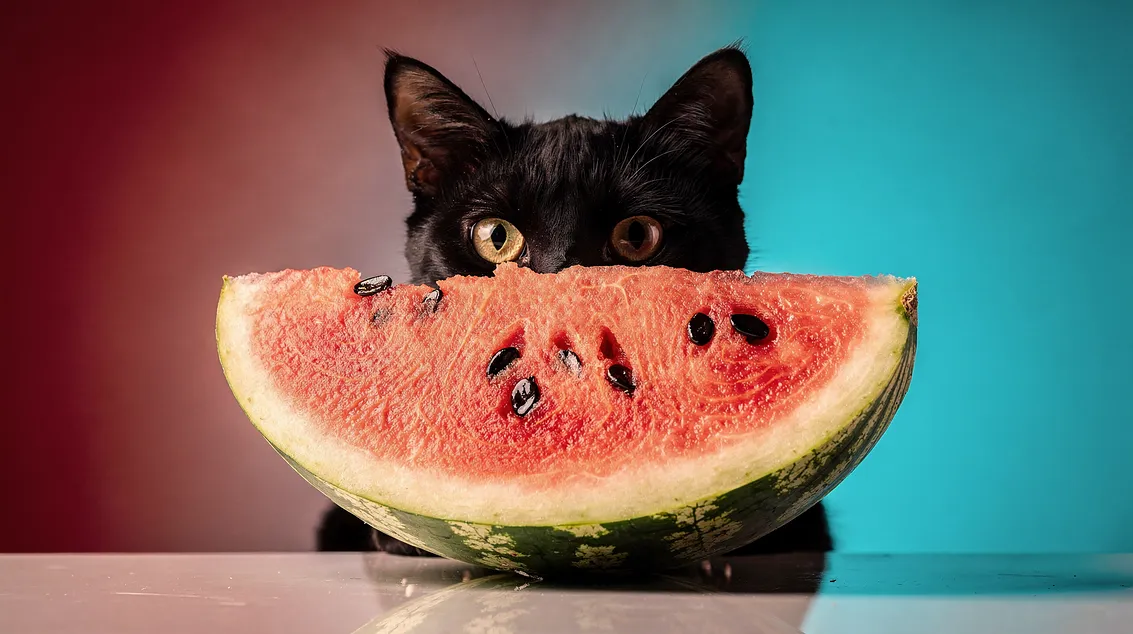
Official prompt
A black cat hiding behind a watermelon slice, paw over its mouth as if giggling. Lush garden setting, warm afternoon light, shallow depth of field. Shot on Fujifilm Pro 400H, soft grain, cinematic framing.

Official prompt
Women's Health magazine cover, April 2025 issue, 'Spring forward' headline, woman in green outfit sitting on orange blocks, white sneakers, 'Covid: five years on' feature text, '15 skincare habits' callout, professional editorial photography, magazine layout with multiple text elements.

Official prompt
Samsung Galaxy S25 Ultra product advertisement, 'Ultra-strong titanium' headline, 'Shielded in a strong titanium frame, your Galaxy S25 Ultra always stays protected' subtext, close-up of phone edge showing titanium frame, dark gradient background, clean minimalist tech aesthetic, professional product photography
Prompting guidance for FLUX.2 Pro
Black Forest Labs documents structured prompting and color control as official features of the FLUX.2 family. In practice, that means you can write prompts that explicitly separate background, subject, and text layers, or specify exact colors with hex codes. These features are especially useful for professional design work where composition and brand consistency matter.
A practical approach is to describe layout first, then style, then content. For example: define the background material, set the lighting direction, specify the subject, and only then add typography or fine details. This ordering mirrors the way structured prompts are presented in the official FLUX.2 documentation and tends to yield more stable results.
Below are sample prompts crafted to align with those official capabilities. They are not direct quotes from the documentation, but they follow the documented prompt‑control patterns.
- “Create a clean product hero shot of a matte black smartwatch on a white desk. Use soft window light, shallow depth of field, and include a small cyan accent #39c5bb on the strap.”
- “Design a minimal infographic poster: top title in bold sans serif, center diagram with three labeled nodes, bottom footer text in small caps. Keep background off‑white with muted gray lines.”
- “Generate a lifestyle scene of a modern kitchen. Place a glass of orange juice on the counter and add a subtle brand logo in the lower right corner.”
Parameter chart (official specs)
| Parameter | Official value |
|---|---|
| Model family | FLUX.2 |
| Positioning | Production at scale (official model selection guide) |
| Multi‑reference support | Up to 10 reference images |
| Output size | Up to 4 megapixels |
| Aspect ratios | Any aspect ratio |
| Text rendering | Supported (typography‑friendly) |
| Color control | Exact color control (hex codes) |
| Structured prompting | Supported |
| Weights | Closed (API access) |
How FLUX.2 Pro compares to other FLUX.2 models
The official FLUX.2 model selection guide positions each model around a different tradeoff. FLUX.2 Pro is the production‑grade option for teams who need strong quality without the maximum‑cost tier. FLUX.2 Max is the top‑end model with grounding search and maximum quality, while FLUX.2 Flex focuses on fine‑grained control. FLUX.2 Klein targets real‑time, high‑volume generation, and FLUX.2 Dev provides open weights for local development.
| Model | Best for | Notes |
|---|---|---|
| FLUX.2 Pro | Production at scale | Balanced for high quality and dependable throughput. |
| FLUX.2 Max | Maximum quality + grounding | Adds grounded generation with real‑time web context. |
| FLUX.2 Flex | Fine‑grained control | Tuned for iterative control and precision workflows. |
| FLUX.2 Klein | Real‑time high‑volume | Optimized for low latency and large scale. |
| FLUX.2 Dev | Local development | Open weights for experimentation and customization. |
When to choose FLUX.2 Pro
Choose FLUX.2 Pro if you need production‑ready visual quality and strong prompt following without stepping into the highest‑cost tier. It is ideal for marketing teams, product design groups, and creative agencies that require consistent outputs, reliable typography, and the ability to align visuals with brand color systems.
If your workflow requires real‑time grounding from web search or the absolute maximum visual quality, FLUX.2 Max is the official step up. If you need lower latency at massive scale, FLUX.2 Klein is the recommended entry point. FLUX.2 Pro remains the sweet spot for high‑quality outputs with strong control while maintaining practical throughput.
Limitations and practical cautions
Even with improved text rendering and structured prompting, no image model is perfect. FLUX.2 Pro can still produce spelling errors with very small text, and highly complex infographics may require multiple iterations. Multi‑reference editing works best when source images are visually consistent in lighting and perspective. For best results, keep prompt constraints explicit and avoid mixing too many competing art directions in a single generation.
FAQ
Is FLUX.2 Pro the same as FLUX.2 Max?
No. FLUX.2 Pro is positioned for production at scale, while FLUX.2 Max is the highest‑quality model and includes grounded generation with real‑time web context.
Does FLUX.2 Pro support multi‑reference editing?
Yes. The FLUX.2 family supports multi‑reference editing with up to 10 source images.
Is text rendering officially supported?
Yes. Black Forest Labs highlights typography and text rendering as an official FLUX.2 capability.
What makes FLUX.2 Pro a good production model?
It balances high visual quality with dependable throughput, making it suitable for scaled commercial workflows without the cost of the maximum‑quality tier.