
What is Nano Banana?
Nano Banana corresponds to Google’s Gemini 2.5 Flash Image model. Google Cloud describes Gemini 2.5 Flash Image as a fast, cost‑effective image generation and editing model that inherits the speed of Gemini 2.5 Flash while adding native image output. In Google’s own words, it is optimized for image understanding and generation, offering a balance of price and performance with strong creative control.
For many teams, Nano Banana is the “daily driver” image model: it is fast enough for rapid iteration and creative exploration, but capable enough to produce polished assets for marketing, product visuals, and educational content.
Official capabilities (Google Cloud blog)
In the Google Cloud announcement of Gemini 2.5 Flash Image (aka Nano Banana), Google highlights three practical capabilities that matter for real‑world workflows. These are not marketing promises—they are the explicit use cases Google calls out for this model.
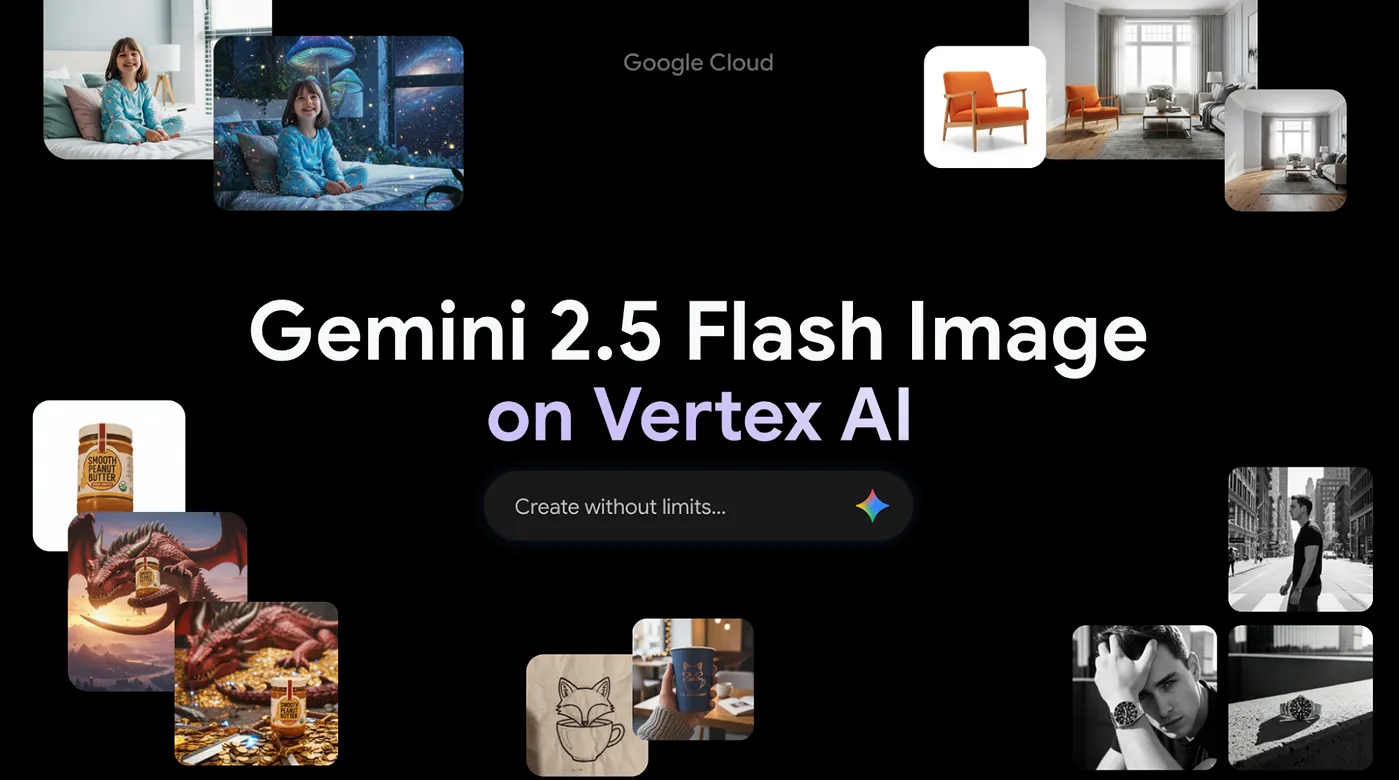
- Multi‑image fusion: combine multiple reference images into one coherent visual, useful for marketing composites, training material, or advertising.
- Character and style consistency: keep the same subject or visual style across multiple generations without heavy fine‑tuning.
- Conversational editing: edit images through natural language, such as removing objects or adjusting small details, and keep iterating in a dialogue.
The same announcement notes that Gemini 2.5 Flash Image ships with built‑in SynthID watermarking to support responsible use and content provenance.
Model specifications on Vertex AI (official documentation)
Google’s Vertex AI documentation lists Gemini 2.5 Flash Image under model IDgemini-2.5-flash-image. It supports text and image inputs, and it can return both text and image outputs. The documented token limits are 32,768 for both input and output. The documentation also lists maximum images per prompt (3), maximum output images per prompt (10), and a set of supported aspect ratios and image MIME types.
| Parameter | Official value |
|---|---|
| Official model name | Gemini 2.5 Flash Image |
| Model ID (Vertex AI) | gemini-2.5-flash-image |
| Inputs | Text, Images |
| Outputs | Text and image |
| Max input tokens | 32,768 |
| Max output tokens | 32,768 |
| Max images per prompt | 3 |
| Max output images | 10 |
| Supported aspect ratios | 1:1, 3:2, 2:3, 3:4, 4:3, 4:5, 5:4, 9:16, 16:9, 21:9 |
| Knowledge cutoff (Vertex AI doc) | June 2024 |
Image generation and editing behavior
The Vertex AI “Generate images with Gemini” documentation clarifies that image output is supported in gemini-2.5-flash-image and that the model can generate images of people. It also describes the model’s ability to iteratively generate images in conversation, to create long‑form text rendering inside images, to interleave text and images in a single response, and to use Gemini’s world knowledge for image creation.
Google further explains that Gemini 2.5 Flash Image supports image editing and multi‑turn editing. This means you can generate an image, ask for a change, and continue to refine the result without restarting from scratch. For practical workflows, this conversational editing loop is one of the model’s most valuable features.
Official prompt examples (short excerpts)
The official Gemini image generation documentation includes short prompt examples. Below are two concise examples from Google’s docs, which illustrate the intended style of prompts for text‑to‑image and text‑rendering use cases.
- “Generate an image of the Eiffel tower with fireworks in the background.”
- “Generate a cinematic photo of a large building with this giant text projection on the front.”
For editing workflows, Google’s image editing guide provides an example such as: “Edit this image to make it look like a cartoon.” This demonstrates the conversational editing capability that Nano Banana is designed for.
Official example images from Google Cloud
The Google Cloud launch blog for Gemini 2.5 Flash Image includes several real‑world examples from customer workflows. The images below are sourced from that announcement and illustrate the kinds of visuals teams are already building with Nano Banana.

Model comparison: Nano Banana vs Nano Banana 2
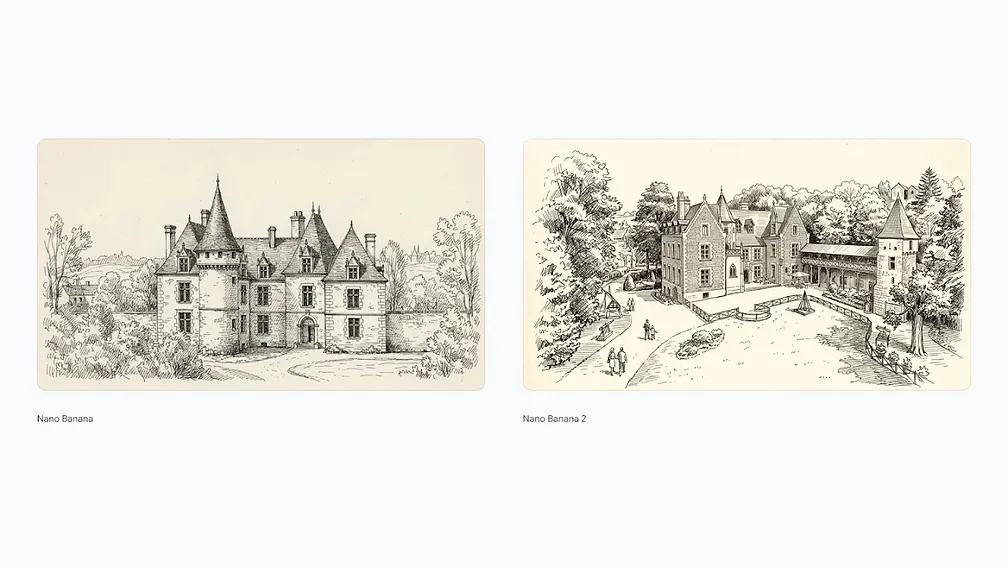
Google’s Gemini Image page includes an official comparison image showing Nano Banana (Gemini 2.5 Flash Image) against Nano Banana 2 (Gemini 3.1 Flash Image). The comparison highlights higher fidelity and detail in the newer model. This is useful if you are deciding between the two Flash‑tier options.
Performance context from Google DeepMind
On the official Gemini Image page, Google describes Gemini 2.5 Flash Image as a state‑of‑the‑art image generation and editing model that offers lower latency and cost compared to higher‑end options. The same page notes that this model was tested on LMArena under the “nano‑banana” name, which is why you often see the two labels used together in community benchmarks. These official statements are important because they clarify that Nano Banana is not a discontinued model—it is the production Flash‑tier image model for teams that prioritize speed and cost efficiency.
In practical terms, this performance positioning means that Nano Banana is a great choice for large‑scale generation tasks, rapid experimentation, and workflows that require quick turnarounds. When you need the highest fidelity or the most precise typography, Nano Banana 2 or Nano Banana Pro can be stronger options. But for everyday creative work, Nano Banana’s speed advantage is often more valuable than the incremental quality improvements of the higher‑tier models.
Limitations and best‑practice guidance
The Vertex AI model documentation lists several constraints: image generation in Gemini 2.5 Flash Image is limited by a 32K token input/output window, a maximum of three input images per prompt, and specific supported aspect ratios. It also notes that some advanced capabilities are not supported, such as grounding with Google Search, function calling, or Gemini Live API.
Practically, this means you should design prompts that are concise and structured. If you need a longer workflow or multiple transformations, iterate step‑by‑step rather than attempting all edits in one prompt. Keep text in the image large and clear, and consider simpler layouts for higher reliability.
When to choose Nano Banana
Choose Nano Banana when you need fast, reliable image generation with good editing support and consistent results, but you do not necessarily need the maximum fidelity of Nano Banana Pro or Nano Banana 2. It is especially useful for rapid design iteration, marketing assets, and workflows that benefit from conversational editing.
FAQ
Is Nano Banana the same as Gemini 2.5 Flash Image?
Yes. Nano Banana refers to Google’s Gemini 2.5 Flash Image model in official documentation.
Does Nano Banana support image editing?
Yes. Google’s documentation highlights conversational image editing and multi‑turn refinement.
What are the most important limits?
The Vertex AI documentation lists a 32,768 token limit for both input and output, and a maximum of three input images per prompt.